

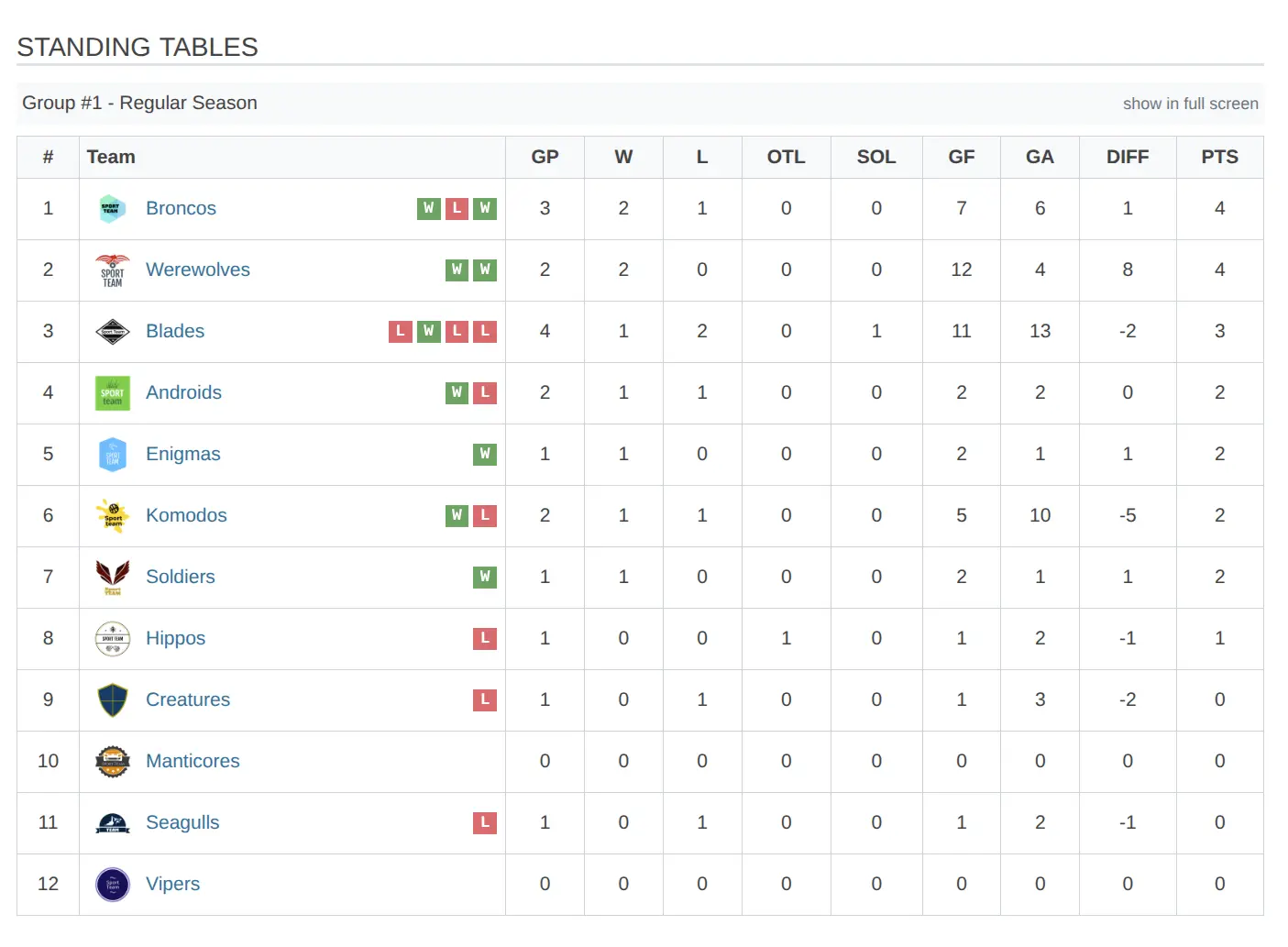
Standings (league tables) display team rankings calculated from game results. Each standing belongs to a tournament group and automatically updates when games are finished. Configure ranking criteria, position colors, and column layouts to match your sport’s format.
How Standings Work
Standings are calculated automatically from finished games:
- Game is marked Finished with scores
- Plugin calculates points and outcome (win/draw/loss)
- Standing table updates with new totals
- Teams are sorted by ranking criteria (points, then tiebreakers)
Tip
You don’t need to manually update standings after each game. The standing recalculates automatically when any game in its group is saved.
🚀 Creating a Standing
Step 1: Open Standings List
Go to Sports Leagues > Tournaments > Standings and click Add New.
Step 2: Select Tournament Group
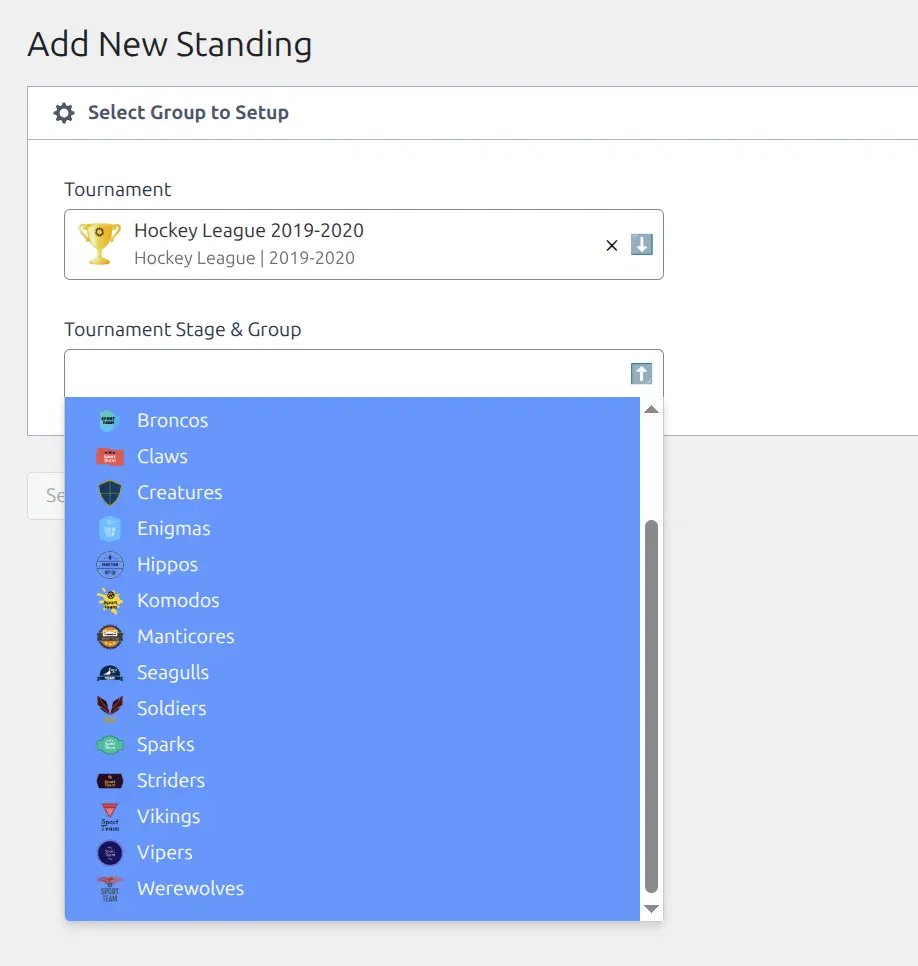
The setup wizard shows tournaments with available groups:
- Find your tournament in the list
- Select the Stage and Group
- Click Select Group & Continue
Note
Only groups without existing standings appear. Each group can have one standing table. Knockout stages don’t appear since they use bracket displays instead of standings.
Step 3: Configure and Save
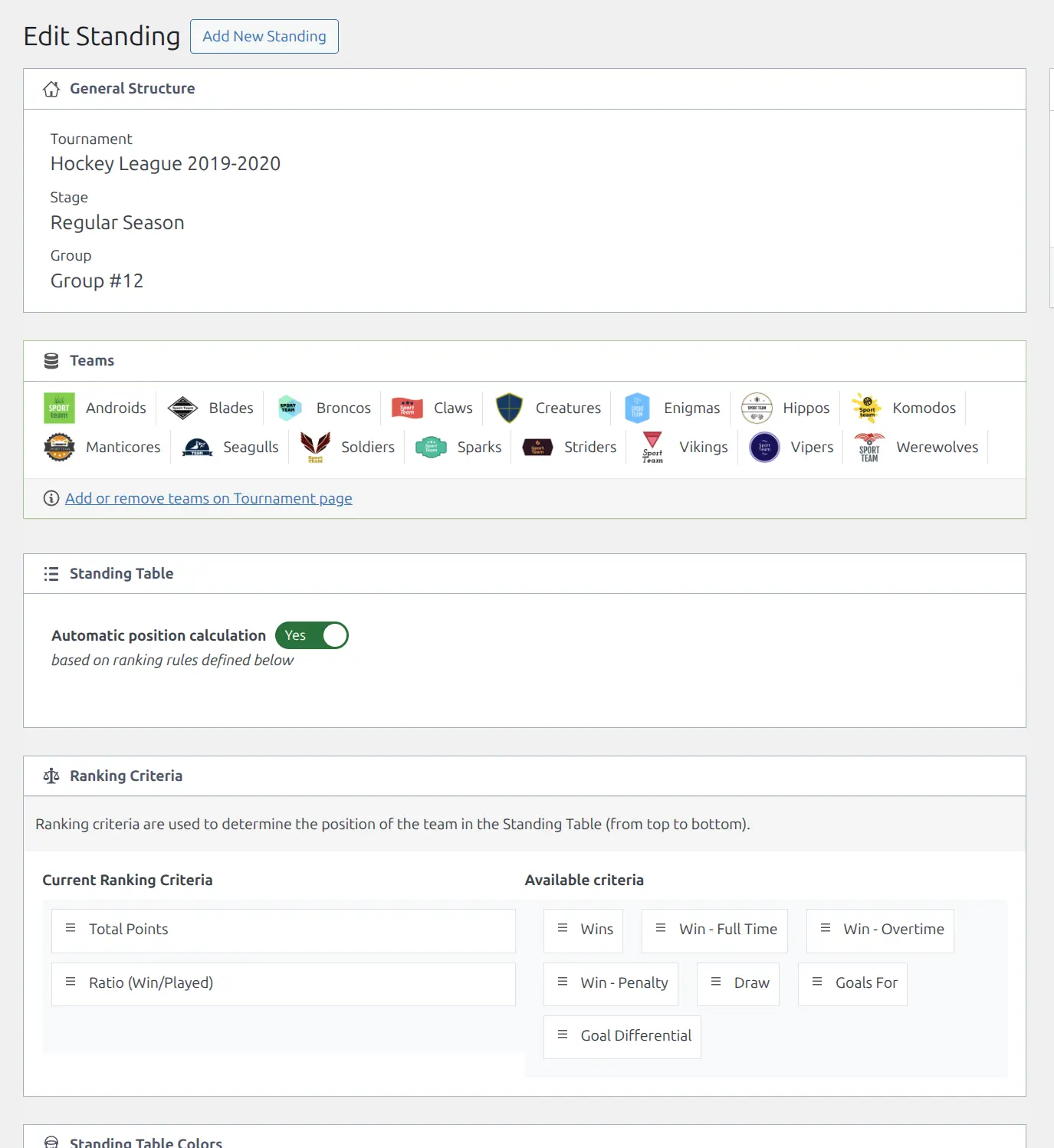
The standing editor loads with all teams from the selected group. Configure ranking rules, colors, and columns, then click Publish.
Ranking Criteria (Tiebreakers)
When teams have equal points, ranking criteria determine their order. Drag criteria from Available to Current and arrange by priority.
| Criteria | Description |
|---|---|
pts | Total standing points |
sd | Score difference (scored minus conceded) |
sf | Scores for (total scored) |
ratio | Win percentage (wins / games played) |
all_win | Total wins (all types) |
ft_win | Full time wins |
ov_win | Overtime wins |
pen_win | Penalty/shootout wins |
draw | Total draws/ties |
Common configurations:
- Soccer/Football: pts > sd > sf (points, goal difference, goals scored)
- Basketball: pts > ratio > sd (points, win percentage, point differential)
- Hockey: pts > all_win > sd (points, wins, goal difference)
Automatic vs Manual Ordering
| Setting | When to Use |
|---|---|
| Automatic (Yes) | Normal operation. Positions calculated using ranking criteria. |
| Manual (No) | Special situations requiring manual position control (e.g., complex head-to-head tiebreakers not handled automatically). |
Position Colors
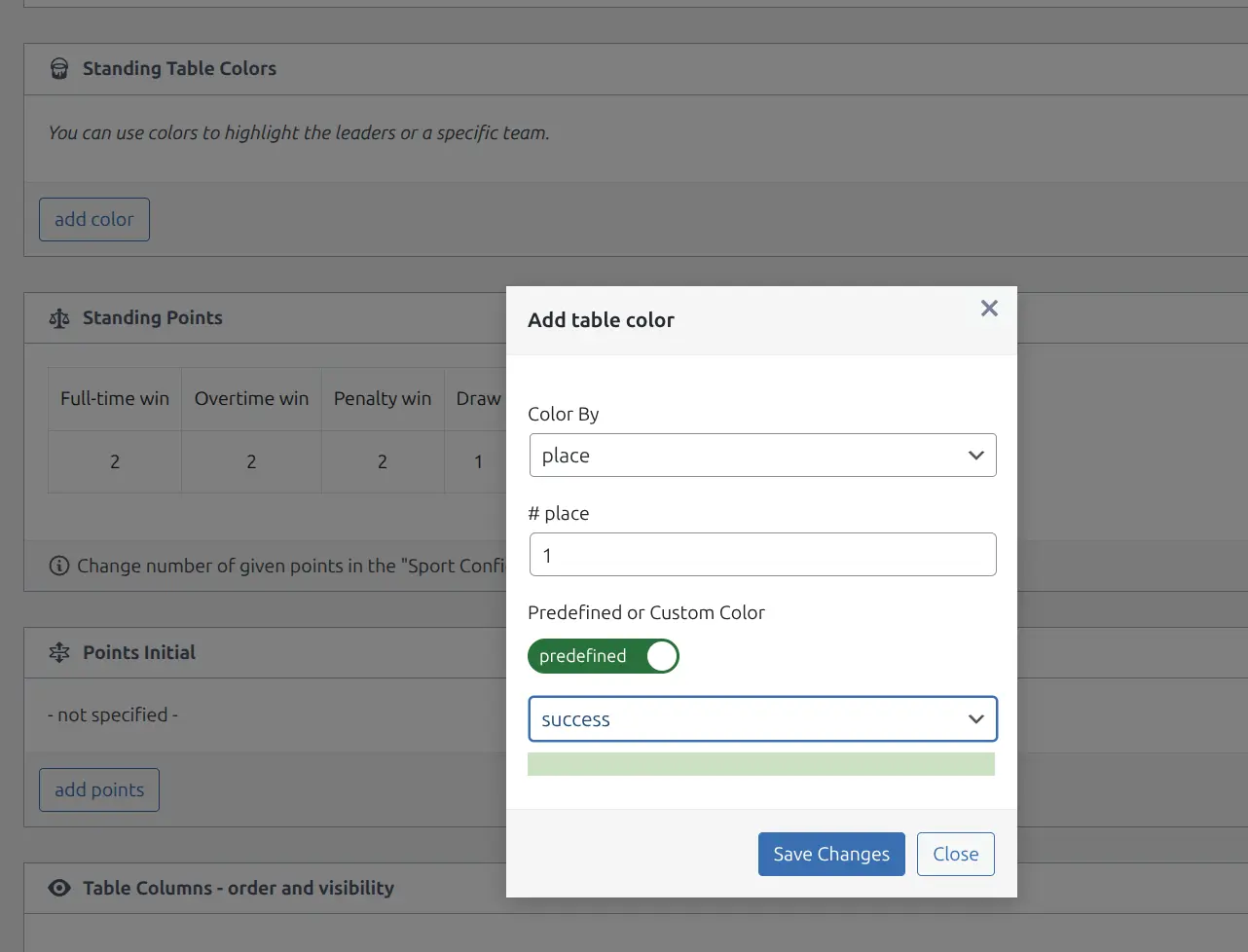
Add background colors to standings rows to indicate playoff spots, promotion zones, or relegation areas.
Adding Colors
- Click Add Color
- Choose target type:
- Place – Color a specific position (1st, 2nd, etc.)
- Team – Color a specific team’s row
- Select the position number or team
- Choose a predefined color or enter a hex code
Available Colors
| Color | Typical Use |
|---|---|
| success (green) | Championship, promotion, conference winner |
| primary (blue) | Playoff qualification, wild card |
| warning (yellow) | Playoff play-in, bubble teams |
| danger (red) | Relegation zone, elimination |
| secondary (gray) | Neutral highlight |
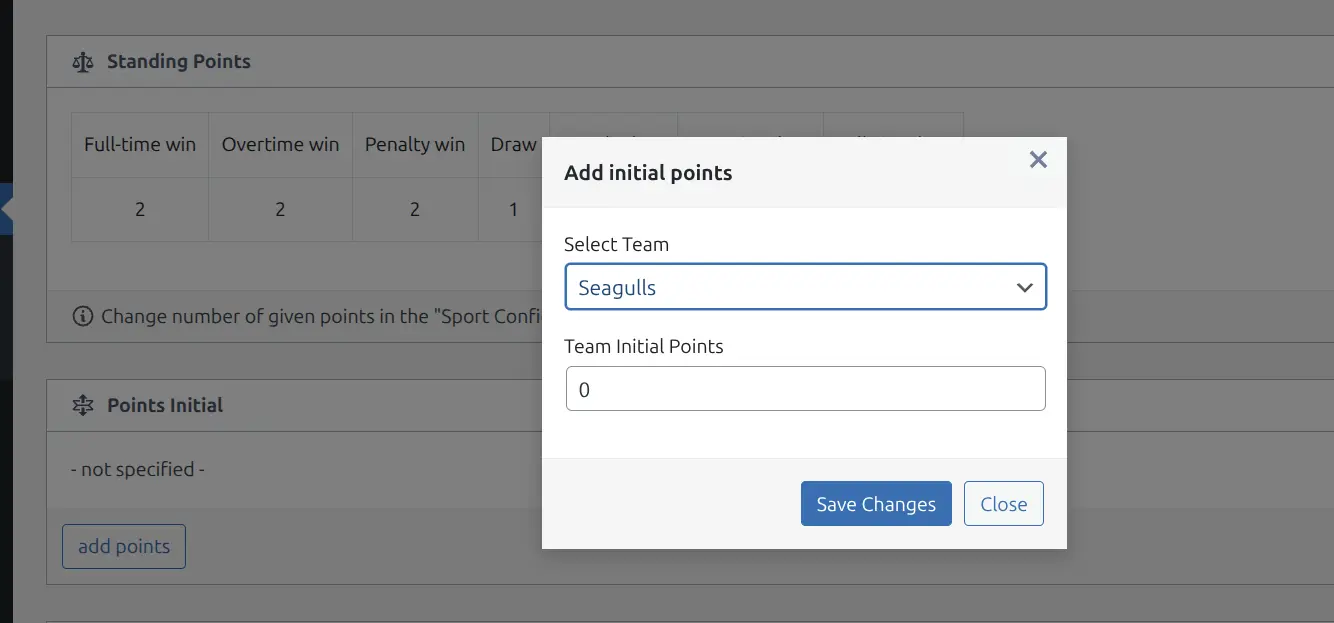
Point Adjustments
Add bonus points or deductions for specific teams:
- Click Add Points
- Select the team
- Enter value (positive for bonus, negative for deduction)
Common uses:
- -3 points – Financial fair play violations
- -1 point – Administrative infractions
- +3 points – Walkover/forfeit awards
- Bonus points – Carried from previous season
Table Columns
Configure which columns appear in the standing table. Two layouts are available:
| Layout | Where Used |
|---|---|
| Main Layout | Full standings on tournament pages, shortcodes with default layout |
| Mini Layout | Widgets, sidebars, compact displays (layout="mini") |
Managing Columns
- Drag columns to change order
- Click eye icon to show/hide
- Hidden columns appear faded with strikethrough
Available Columns
| Column | Abbr | Description |
|---|---|---|
| Played | P | Games played |
| Win – all | W | Total wins (all types combined) |
| Win – full time | FTW | Regulation wins only |
| Win – overtime | OTW | Overtime/extra time wins |
| Win – penalty | PW | Penalty shootout wins |
| Draw | D | Draws/ties |
| Loss – all | L | Total losses |
| Scores – for | SF | Total points/goals scored |
| Scores – against | SA | Total points/goals conceded |
| Scores – difference | SD | SF minus SA |
| Ratio | Ratio | Win percentage (wins / played) |
| Bonus Points | BP | Bonus points from games |
| Points | Pts | Total standing points |
Table Notes
Add explanatory notes below the standing table. Notes support rich text and color placeholders that match position colors:
%success% - Promoted to Premier League
%primary% - Championship Playoffs
%danger% - Relegated to League One
Cloning Standings
Copy settings from an existing standing to a new one:
- Open the standings list
- Find the standing to clone
- Click Clone
- Select the new tournament group
- Click Select Group & Continue
The new standing inherits ranking rules, column order, colors, and notes from the original.
Standing Settings (Defaults)
Set defaults for new standings at Sports Leagues > SL Settings & Tools > Standing Settings:
| Setting | Description |
|---|---|
| Ranking Criteria | Default tiebreaker order for new standings |
| Columns Order | Default column arrangement (Main Layout) |
| Mini Columns Order | Default column arrangement (Mini Layout) |
Note
These settings only apply to newly created standings. Existing standings keep their current configuration.
Displaying Standings
On Tournament Pages
Standings automatically appear on tournament pages when a standing exists for the group.
Using Shortcode
[sl-standing id="123"]| Parameter | Default | Description |
|---|---|---|
id | (required) | Standing table ID |
title | empty | Custom title above table |
layout | default | mini for compact display |
partial | empty | Subset: 1-5 (positions 1-5) or team ID (shows nearby teams) |
exclude_ids | empty | Team IDs to hide (comma-separated) |
bottom_link | none | tournament shows link to full standings |
Examples
Top 5 teams only:
[sl-standing id="123" partial="1-5"]Mini layout for sidebar:
[sl-standing id="123" layout="mini" title="Eastern Conference"]Teams around a specific team (context view):
[sl-standing id="123" partial="45"]Using Widget or Block
- Widget: Add “SL Standing” to sidebar widget areas
- Block: Search “Standing” in block editor to add the block
Premium Standing Features
The Premium version adds advanced standing capabilities:
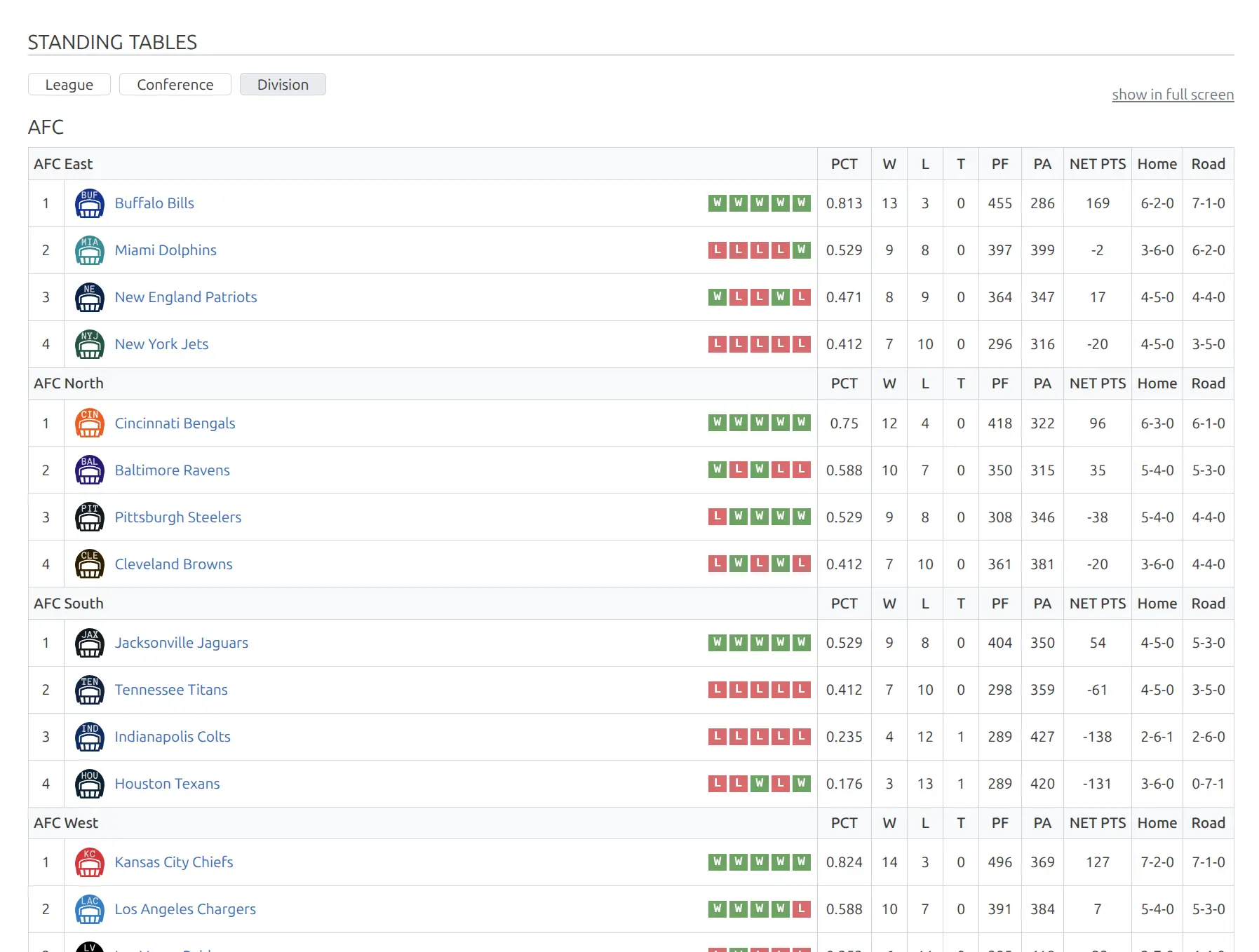
Advanced Columns Builder
Create custom columns beyond the standard set:
- Streak – Current win/loss streak (W5, L3)
- Last 5/10 – Record in last 5 or 10 games (W-D-L format)
- Division Record – Record against division opponents
- Conference Record – Record against conference opponents
- Head-to-Head – Record/percentage against standing teams
- Stats Columns – Add team stats as columns
- Calculated Columns – Math on other columns (sum, ratio, difference)
- Composed Columns – Combine values like “3-1” from multiple fields
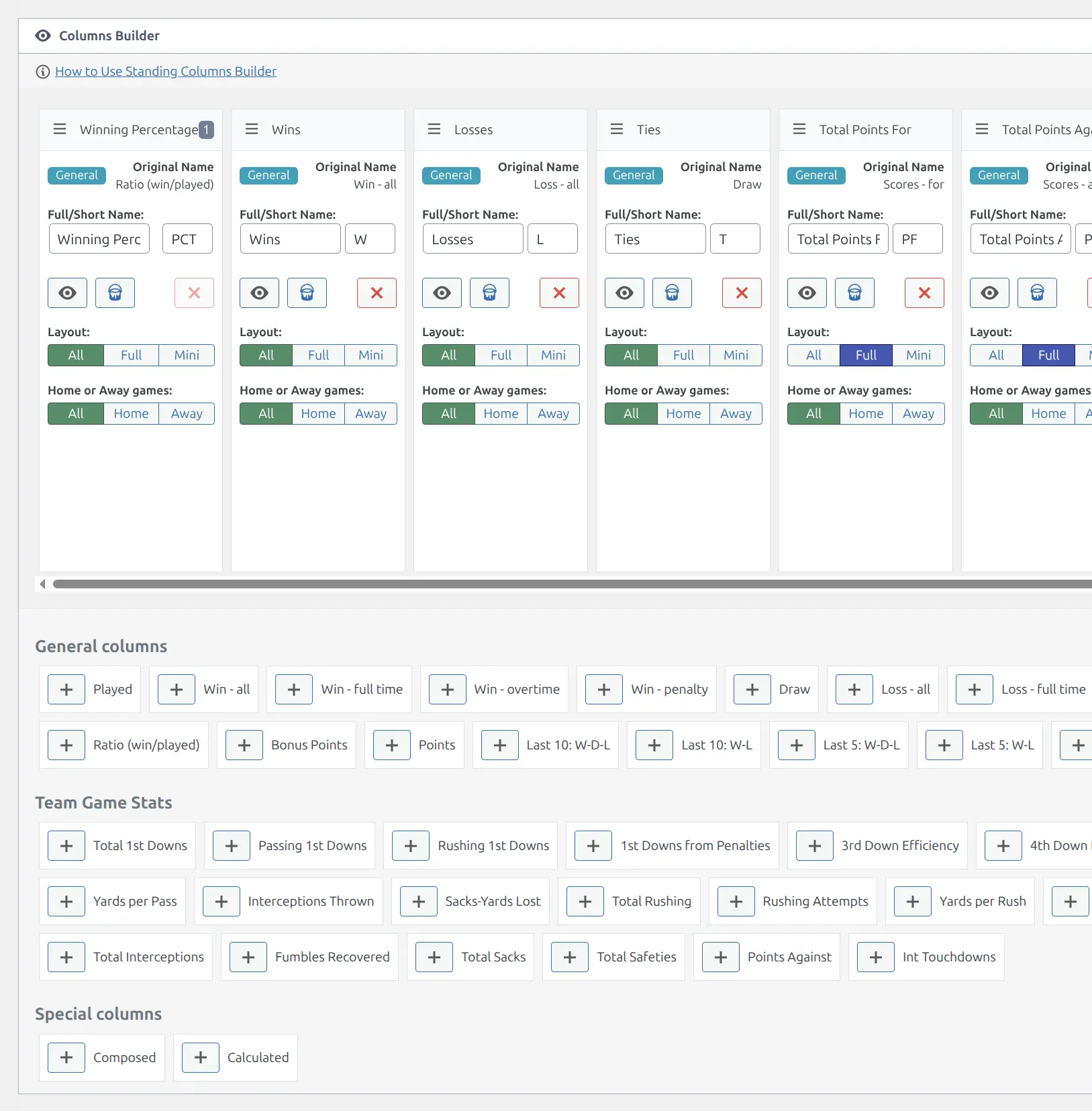
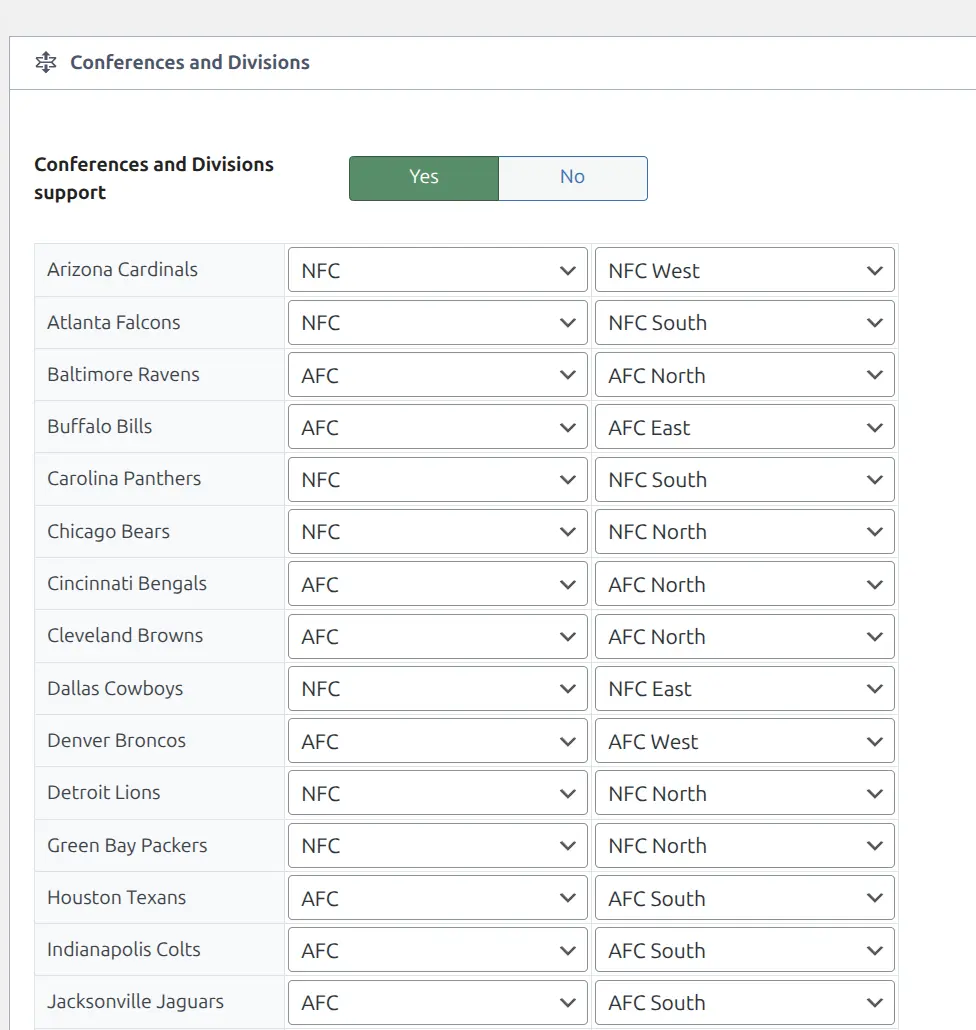
Conference & Division Support
Organize teams into conferences and divisions. Display standings grouped by conference with separate headers.
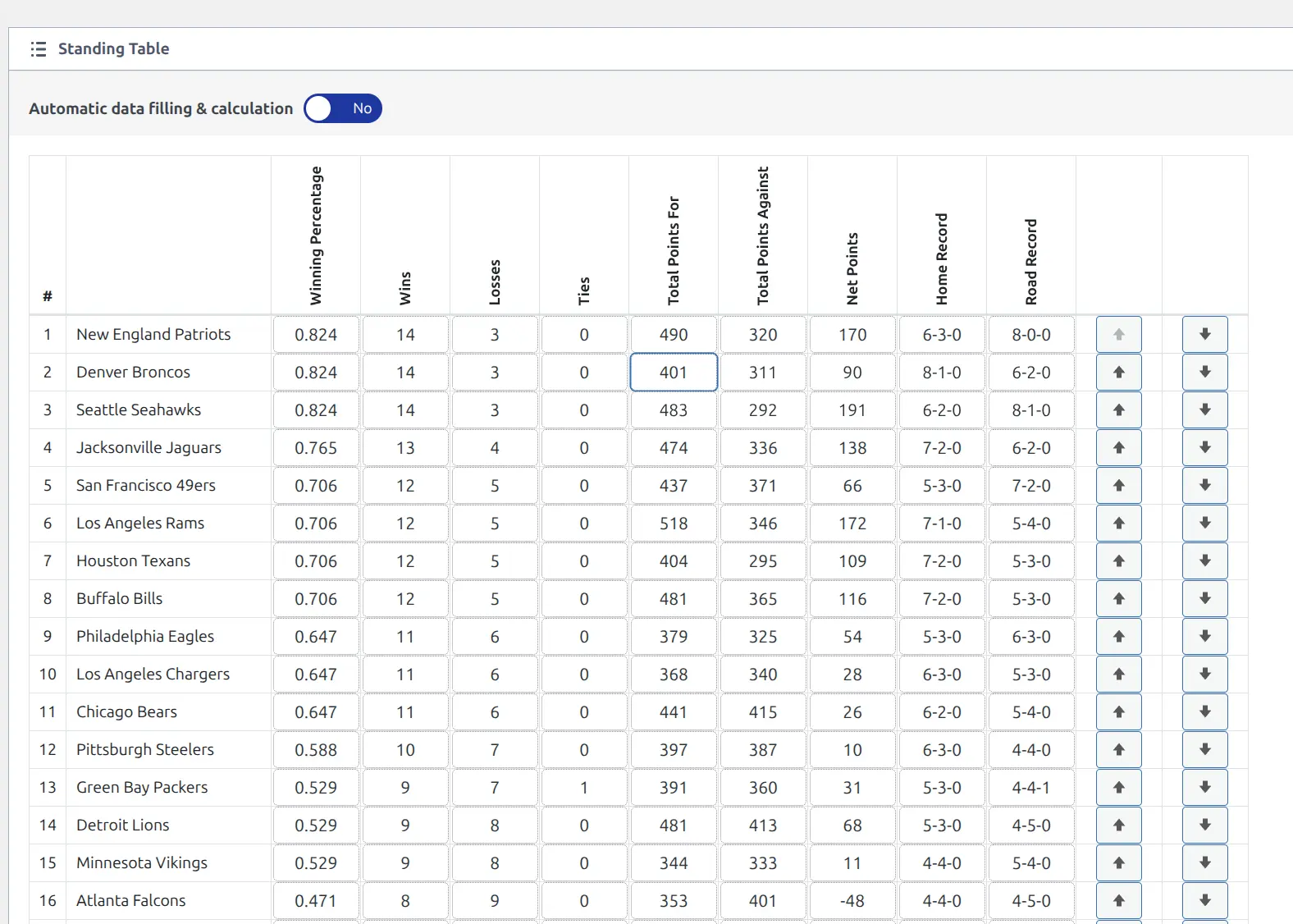
Manual Data Entry
Enter standing values manually without needing game data. Useful for:
- Historical seasons without full game records
- External data imports
- Mid-season adjustments
Core vs Premium Comparison
| Feature | Core | Premium |
|---|---|---|
| Automatic calculation from games | ✅ | ✅ |
| Ranking criteria / tiebreakers | ✅ | ✅ |
| Position colors | ✅ | ✅ |
| Point adjustments | ✅ | ✅ |
| Column show/hide/reorder | ✅ | ✅ |
| Main + Mini layouts | ✅ | ✅ |
| Shortcode partial display | ✅ | ✅ |
| Clone standings | ✅ | ✅ |
| Advanced columns builder | — | ✅ |
| Streak / Last 5-10 columns | — | ✅ |
| Division/Conference record columns | — | ✅ |
| Head-to-head columns | — | ✅ |
| Calculated columns (formulas) | — | ✅ |
| Composed columns | — | ✅ |
| Stats columns from team stats | — | ✅ |
| Conference & Division partitions | — | ✅ |
| Manual data entry mode | — | ✅ |
| Column visibility per layout | — | ✅ |
| Column background colors | — | ✅ |
| Column borders | — | ✅ |
| Home/Away filtering per column | — | ✅ |
🆘 Troubleshooting
Standing Not Updating
Problem: Positions/points don’t reflect recent games.
- Verify games are marked Finished
- Confirm games are in the correct tournament group
- Open standing and click Update to force recalculation
- Clear cache: SL Settings & Tools > Toolbox > Clear Cache
Wrong Positions
Problem: Teams appear in unexpected order.
- Check ranking criteria order (higher priority = first)
- Verify point system in Sport Configurator
- Look for point adjustments affecting totals
- Confirm “Automatic Position Calculation” is enabled
Tournament Group Not Showing
Problem: Can’t find tournament in standing creation.
- Verify tournament has a Group Stage (not only knockout)
- Check if standing already exists for that group
- Ensure tournament is Published
- Add teams to the stage group
📚 Related Documentation
- Tournaments – Create tournaments with stages and groups
- Games – Record game results that feed standings
- Standing Table – Advanced Features [PRO] – Advanced columns and manual data
- Conference & Division Support [PRO] – Split standings by conference
- Text Options – Customize standing column labels